Insights · Trades & HVAC
HVAC Website Design Checklist: 25 Must-Haves That Drive More Calls
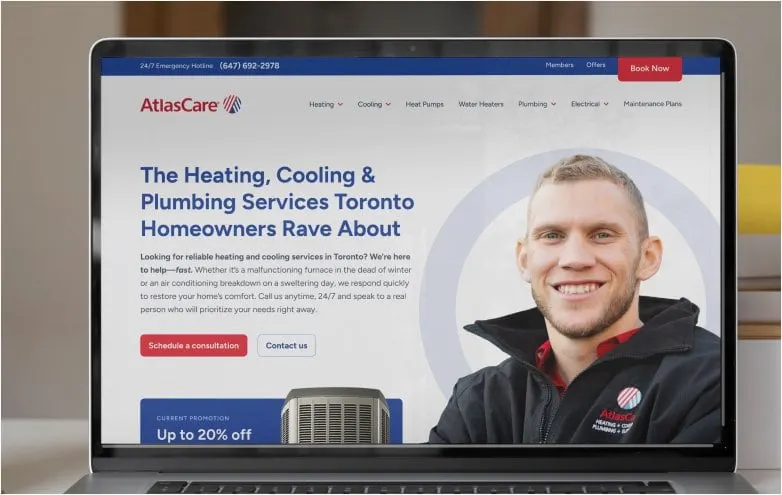
A successful HVAC website isn’t about flashy visuals or trendy layouts — it’s about getting the phone to ring. When homeowners land on your site, they’re often stressed, short on time, and looking for a fast, reliable solution. Your website’s job is to remove doubt, guide them clearly, and make it easy to contact you.
This HVAC Website Design Checklist outlines 25 essential elements that help Canadian HVAC companies turn website visitors into calls, quote requests, and booked jobs. If your site is missing even a few of these, you could be losing leads to competitors every day.
What Does an HVAC Website Really Need to Do?
Let’s define it.
HVAC customers usually visit your site with a specific problem: no heat, no cooling, or an upcoming system replacement. In these moments, visitors aren’t browsing — they’re deciding who to call.
Effective HVAC website design in Canada focuses on:
- Immediate clarity about services offered
- Strong visibility of contact options
- Reassurance that you’re capable and professional
If visitors can’t quickly understand what you do, where you operate, or how to reach you, they’ll leave — even if you offer great service.
This is why modern HVAC website design in Canada isn’t just about appearance — it’s about conversion psychology, local SEO, and clarity under pressure.
Conversion Essentials Every HVAC Website Needs
Miss a few of these, and you’re quietly losing calls.
Sticky Call-to-Action Buttons
Sticky CTAs keep your primary action — calling or booking — visible as users scroll. On mobile, this dramatically increases call volume by removing the need to hunt for contact details.
Micro-copy idea: “ 📞 Tap me anytime — I’m always here!”
Tap-to-Call Phone Numbers
Mobile users expect to tap once and connect. Non-clickable phone numbers add friction and reduce conversions, especially during urgent situations.
Emergency Service Banner
If you offer emergency or same-day service, highlight it immediately. This reassures stressed visitors and positions your business as responsive and available.
Playful microcopy: “ 🔥 Need heat now? Don’t sweat it — call us!”
One Clear Primary CTA Above the Fold
Visitors should instantly know what to do next. A single, dominant CTA prevents confusion and focuses attention on the action that drives revenue.
Fast Page Load Times
Speed matters. Slow-loading pages increase bounce rates, lower search visibility, and frustrate mobile users — all of which cost you calls.
Service Pages That Turn Searches Into Calls
1. Dedicated Pages for Each Service
Each major service deserves its own page. This improves SEO and ensures visitors land on content that directly matches their search intent. Well-structured service pages also help search engines better understand your offerings — a foundational principle in strategic HVAC website design.
2. Location-Relevant Content
Mentioning your service areas helps confirm relevance for local visitors and strengthens local search performance across Canadian cities.
3. “What’s Included” Sections
Clear explanations of what happens during a service call reduce anxiety and set realistic expectations before the phone even rings.
4. Pricing Transparency or Ranges
Even general pricing guidance helps visitors decide whether to contact you, filtering out hesitation early in the process.
5. Service-Specific Calls to Action
Each service page should guide visitors toward the most logical next step — booking that specific service or requesting a quote.
Trust Signals That Help Visitors Choose You
Customer Reviews & Testimonials
Reviews provide social proof that others have chosen you successfully. Placing them near CTAs reinforces decision-making.
Certifications & Industry Badges
Licensing, manufacturer partnerships, and safety certifications communicate professionalism at a glance.
Before-and-After Photos
Visual examples show real results and help visitors understand the scope and quality of your work.
Warranty & Guarantee Messaging
Clear warranty language reduces perceived risk and gives visitors confidence in moving forward.
Team & Technician Photos
Showing real staff humanizes your business and builds familiarity before the first call.
🔥 Playful microcopy: “Meet the friendly faces who’ll get your heat back on!”
Booking, Financing & Lead Capture Features
Simple Booking or Quote Forms
Short, focused forms perform better. Asking only for essential details improves completion rates, especially on mobile.
Financing & Payment Options
Highlighting financing removes cost anxiety and encourages enquiries for larger projects like system replacements.
Spam Protection Without Friction
Behind-the-scenes spam filtering keeps forms usable while protecting your inbox from junk submissions.
Call & Form Tracking
Tracking reveals which pages, services, and campaigns generate real leads — not just traffic.
Clear Confirmation Messaging
After submitting a form, visitors should know what happens next. Clear follow-up messaging reinforces professionalism.
Mobile UX & Technical Must-Haves
Mobile-First Navigation
Navigation should prioritize speed and simplicity, making it easy to reach services or call with one hand.
Clickable Address & Service Area
Clickable maps and addresses help users quickly confirm that you serve their location.
SEO-Friendly Page Structure
Clean headings, logical internal links, and crawlable content support both rankings and usability.
Accessibility Basics
Readable text, strong contrast, and clear buttons ensure your site works for all users.
Ongoing Performance Monitoring
Websites aren’t set-and-forget. Regular monitoring prevents broken elements, slowdowns, and lost leads.
Putting the Checklist Into Action
Most HVAC websites are missing several of the essentials on this checklist — and each missing element quietly costs you opportunities. Maybe the site looks fine on desktop but is frustrating on mobile. Maybe the services are listed, but it’s not clear what to do next. Or maybe visitors feel unsure because the right trust signals aren’t visible at the moment they’re deciding whether to call.
While small fixes can help, the biggest improvements come from a cohesive strategy. When design, messaging, user experience, and technical performance all work together, your website stops being a passive brochure and starts functioning as a reliable lead-generation system.
High-performing HVAC websites in Canada require more than content — they need strategy, search engine optimization, local targeting, and conversion-focused design. Partnering with a specialized HVAC Website Design Agency like Envy Design ensures your site is built around real customer behaviour and Canadian search patterns, not generic templates. If you’re looking to strengthen performance across mobile UX, service pages, and local SEO, you can explore our HVAC website design services to see how we approach it.
Frequently asked questions
What makes an HVAC website high-converting?
A high-converting HVAC website makes it easy for visitors to take action, whether calling or booking a service. Key elements include clear calls-to-action, fast load times, mobile-friendly layouts, and visible proof like reviews.
In other words, it removes every excuse not to contact you. Homeowners should understand what you offer and where you work within seconds, and they should never have to search for your phone number. Each service page should lead to a specific next step. Trust signals should sit close to those steps. And the whole site should load quickly on a phone. Our HVAC website design checklist covers these must-haves in more detail so you can see how your current site measures up.
How important is mobile design for HVAC websites?
Very. Many homeowners search on their phones under pressure, so sticky call buttons, tap-to-call numbers, fast pages and simple one-handed navigation directly affect how many calls you get.
Picture someone standing in a cold basement looking up furnace repair. They don't want to pinch and zoom or hunt through a tiny menu. A mobile-first HVAC website puts the most important actions within easy reach and keeps pages light so they load quickly on a cellular connection. We design and test HVAC websites on real phones throughout the project, not just at the end, because that's where so many of your customers will meet you for the first time.
Do HVAC companies need separate pages for each service?
Yes. Each major service deserves its own page so visitors land on content that matches their search, and so search engines understand what you offer. Each page should mention your service areas and end with a service-specific call to action.
Separate service pages also give you room to answer the questions homeowners ask about each job, show relevant photos and feature reviews from customers who used that service. That makes each page more helpful and more persuasive. Start with the services that matter most to your business, such as furnace repair, AC installation and maintenance plans, and add more as you grow. We plan a scalable page structure when we build HVAC websites so adding services later is simple.
Should HVAC websites show pricing?
Even general pricing guidance or ranges help. They let visitors decide whether to contact you and remove hesitation early, and highlighting financing options eases cost anxiety on larger jobs like system replacements.
Many HVAC companies hesitate to mention pricing because every job is different. That's fair, but saying nothing can leave homeowners guessing or assuming the worst. Explaining what affects cost, sharing typical ranges where you're comfortable or describing how quotes work can build trust. You can also highlight free estimates or diagnostic fees if you offer them. Whatever you include, keep it accurate and up to date so your website matches what customers hear on the phone.
What trust signals matter most on HVAC websites?
The most important are customer reviews and testimonials placed near your calls to action, certifications and manufacturer badges, before-and-after photos, clear warranty and guarantee messaging, and photos of your real team and technicians.
Real team photos deserve special mention. Homeowners are letting someone into their home, and seeing the friendly faces of the actual technicians can be far more reassuring than polished stock images. Reviews work best when they're specific and local. Certifications carry more weight when you explain what they mean. Warranties reduce the sense of risk on big jobs. Together, these trust signals help an HVAC website feel credible at exactly the moment a homeowner is deciding whether to call.
Are booking forms better than phone calls?
You don't have to choose. Phone calls suit urgent situations, so make numbers tap-to-call and keep a sticky call button visible. Short, simple booking or quote forms capture visitors who prefer not to call, especially when they ask only for essential details.
Different homeowners have different habits. Some want to talk to a person right away, while others are browsing late at night or at work and would rather fill out a form. Offering both makes sure you don't lose either group. Make the form short, explain when you'll follow up and route submissions quickly to your team. Tracking calls and form submissions separately also shows you which option your customers prefer.
Can a better website really increase call volume?
Yes. Most HVAC websites are missing several essentials, and each gap quietly costs leads. When design, messaging, user experience and technical performance work together, the site stops being a passive brochure and becomes a reliable lead-generation system.
We can't promise a specific number of calls, since results depend on your market, reputation and marketing. But fixing the basics, like clear service pages, tap-to-call buttons, fast mobile performance and visible trust signals, removes the friction that sends homeowners to a competitor. The best way to know is to measure. Set up call and form tracking before and after improvements so you can see the difference your HVAC website makes.
Keep reading